
Call History Manager
Tools

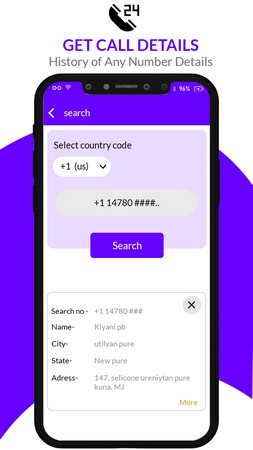
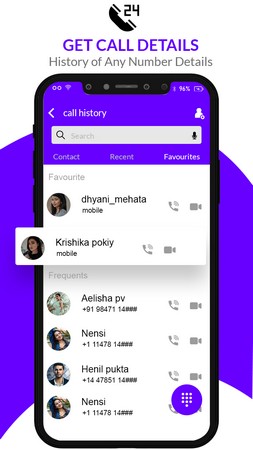


Call History Manager is a lightweight Android utility that helps you keep track of incoming, outgoing, and missed calls. If you often need to retrieve a number that isn’t saved in your contacts, this app lets you browse your call log and identify unknown callers.
Beyond simple listing, the tool offers search and basic export functions so you can save your call history for later reference. It’s designed for users who want quick access to their call records without the clutter of a full‑featured phone manager.
Quick Information
| App/Game Name | Call History Manager |
| Latest Version | 1.1 |
| Developer | Not listed |
| Category | Apps / Tools |
| App Size | 5.39 MB |
| Package Name | com.metricsolution.callhistorymanager |
| Last Updated | 9 January 2026 |
What Is Call History Manager?
Call History Manager reads the phone’s native call log database and presents the information in an easy‑to‑navigate interface. Core features include:
- Display of all call entries with date, time, duration and number.
- Search by name, number, or date range.
- Export of call records to a simple text or CSV file.
- Identification of calls from numbers not saved in your contacts.
The app is suited for anyone who frequently needs to reference past calls, such as professionals managing client calls or users who simply want to avoid missing important numbers. It does not provide advanced call blocking or caller ID services, which are handled by dedicated apps.
Compatibility
| Android Version | ✓ Verified — Android 4.4 and Above |
| Architecture (ARM64 / 32-bit) | Not Verified |
| Internet Connection | ✓ Verified — May be required for ads, updates, or login |
| Storage Needed | Not Verified |
| OBB/Data Files | Not Verified |
| Root Required | Not Verified |
How to Install
- Download the Call History Manager APK file to your Android device.
- If prompted, enable installation from “Unknown sources” in Settings > Security (or Settings > Apps > Install unknown apps for the browser you used).
- Open the downloaded APK and tap “Install”.
- Once installation completes, launch the app from the app drawer.
- Grant the required permissions (Phone, Storage) so the app can read call logs and export files.
Troubleshooting
- App not installed: Ensure you have enough storage space and that the APK is compatible with your Android version.
- Crashes on startup: Verify that the required permissions are granted. Clearing app data and reinstalling can also help.
- Call logs not showing: The app needs the “Phone” permission. Re‑grant it in Settings > Apps > Call History Manager > Permissions.
- Exported file is empty: Check that you have granted “Storage” permission and that the destination folder is writable.
Safety & Security
Call History Manager is a standard APK that reads only the call log and writes export files to your device. As with any third‑party package, download it from a reputable source, review the permissions it requests, and avoid entering sensitive personal data within the app. Future updates from the original developer may change functionality, so keep an eye on version changes.
How Call History Manager Compares
| Feature | Call History Manager | Truecaller | Simple Call Log |
|---|---|---|---|
| Price | Free | Free with optional premium | Free |
| Platform | Android | Android, iOS | Android |
| Standout Feature | Simple call‑log export | Caller ID & spam blocking | Minimalist UI, quick search |
| Best for | Users who need basic log viewing and export | People who want ID, spam protection, and contact syncing | Fans of a no‑frills call‑log viewer |
Alternatives
- Truecaller: Offers caller identification, spam blocking, and call‑log management with cloud backup.
- Simple Call Log: Focuses on a clean interface and quick search, suitable for minimalists.
- Call Log Monitor: Provides detailed statistics, call‑duration charts, and export options.
Final Verdict
Call History Manager is a straightforward tool for anyone who wants to view, search, and export their call logs without extra bells and whistles. It works well on most Android devices, but it lacks advanced features like spam detection or cloud syncing found in larger competitors. If you only need basic log access, it’s a solid, free choice; otherwise, consider an app with richer functionality.
Frequently Asked Questions
The app only requests permission to read call logs and write files; install it from a trusted source and review the permissions before proceeding.
The app runs on Android 5.0 (Lollipop) and newer, though newer versions may offer better performance.
No, Call History Manager works with standard user permissions; root is not required.
Yes, the app includes an export function that saves logs as a text or CSV file on your device.
It displays all call entries, including unknown numbers, allowing you to identify callers not stored in your address book.
The app itself does not delete entries; you need to use the phone’s native call log or a separate manager to remove records.
Yes, the app lists calls from both SIM slots as they appear in the system call log.
If you already have a version installed, the new APK will replace it after you confirm the update during installation.